SunFounder’s PiCar-X combines a Raspberry Pi robot-car chassis with camera, Python, voice and AI-oriented software paths. It targets classrooms and home labs that want a moving Linux project while still exposing power, wiring and package-management decisions.
A Linux robot car rather than a sealed toy
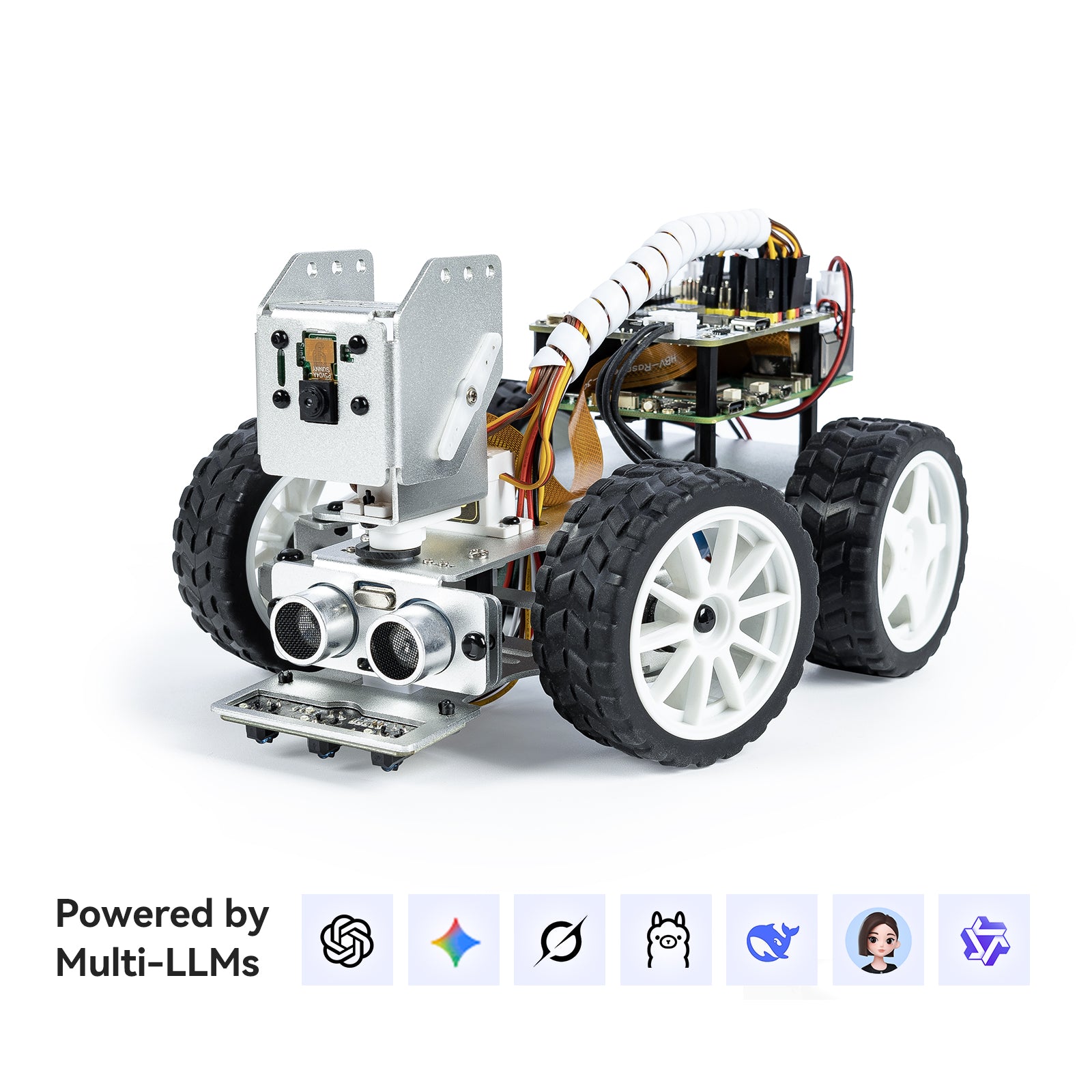
The SunFounder PiCar-X is a Raspberry Pi-based AI video robot car kit. SunFounder’s current product page describes it as an AI video robot car kit for Raspberry Pi 5, Raspberry Pi 4, Raspberry Pi 3B+, and Raspberry Pi Zero 2W, with voice and video recognition, Python and Scratch support, a camera, battery, and AI integrations. The page lists the kit at $89.99 at the time of publication, with the Raspberry Pi itself not included.
The product pitch is broad: computer vision, voice interaction, OpenCV, MediaPipe, text-to-speech, speech-to-text, and multi-LLM support including cloud models such as ChatGPT-4o, Gemini, Grok, DeepSeek, Qwen, Doubao, plus Ollama for local LLM workflows. That makes PiCar-X more than a beginner line-following car. It is positioned as a bridge between classic educational robotics and the newer “AI robot companion” category.
Where PiCar-X fits
PiCar-X looks strongest for three groups. The first is STEM classrooms that already use Raspberry Pi and want a visible, moving project instead of another blinking-LED lab. The second is parents or mentors helping a motivated middle-school or high-school learner move from block coding into Python. The third is makers who want a compact test platform for camera streaming, sensor fusion, offline voice control, and LLM-assisted robot behaviors without building a chassis from scratch.
The kit is less obviously ideal for teams that need a competition-grade drivetrain, industrial reliability, or a robot that works out of the box with no Linux setup. SunFounder’s own documentation makes clear that buyers still need to prepare a Raspberry Pi board, microSD card, and an appropriate power adapter, so the real purchase is a robotics curriculum plus hardware platform, not a sealed consumer robot.
Power and setup are part of the platform
The most important design signal is the Raspberry Pi dependency. SunFounder’s official “What Else Do You Need?” page says compatible models include Raspberry Pi 5, Raspberry Pi 4, Raspberry Pi 3, and Raspberry Pi Zero 2W. It also recommends power supplies appropriate to each Pi generation, including a 5V 5A USB-C supply for Raspberry Pi 5 and a 5V 3A USB-C supply for Raspberry Pi 4. That matters because undervoltage is one of the fastest ways to make a robotics kit look unreliable when the real problem is power budgeting.
The documentation also recommends at least a 16GB microSD card, with 32GB preferred for stability, and suggests a monitor, HDMI cable, keyboard, and mouse for initial setup. In practice, that means PiCar-X is best treated as a real Linux robotics project. The setup burden is part of the learning value, but it should be priced into classroom planning.
On the software side, the official PiCar-X documentation includes assembly, Python, Ezblock, AI interaction, hardware, and FAQ sections. The AI interaction section specifically covers text-to-speech, speech-to-text, LLM workflows, offline voice control with Vosk, text/vision interaction with Ollama, online LLM connections, a local voice chatbot, and an AI voice assistant car. That is a useful curriculum signal: the kit is not only about movement, but about the software stack around movement.
AI breadth increases the support burden
The biggest risk is expectation mismatch. “AI robot car” can sound like a finished autonomous robot, while PiCar-X appears better understood as a learning platform. Buyers should expect setup, debugging, software dependencies, and calibration work.
The second risk is total system cost. The headline kit price does not include every required component for a new Raspberry Pi user. A Pi board, microSD card, power adapter, monitor or remote-access setup, and possibly batteries or charging workflow can move the real classroom or home-lab budget higher than the kit price alone suggests.
The third risk is software drift. Robotics education kits depend on documentation staying synchronized with operating-system releases, Python packages, camera libraries and AI APIs. SunFounder’s current documentation is a positive signal, but public pages cannot establish how cleanly a new builder can recover from outdated dependencies.
The fourth risk is privacy and classroom governance around AI features. If online LLM integrations are used, educators should understand what data leaves the local device, which accounts are required, and whether the same lesson can run offline or in a restricted network environment.
When the setup is justified
PiCar-X should be on the shortlist for buyers who want a Raspberry Pi robotics kit that can grow from basic movement into camera, Python, voice, and AI experiments. It is especially interesting for small STEM programs, robotics clubs, homeschool labs, and makers who want a platform that looks approachable but still exposes real engineering tradeoffs.
Buyers who only want a toy-like robot with minimal setup should be careful. So should schools without staff or mentors comfortable with Raspberry Pi imaging, Linux troubleshooting, power supplies, and software-package maintenance. In those environments, the kit may still be useful, but only if time is allocated for preparation before students touch it.
The decision boundary
PiCar-X’s strongest case is the breadth of its documented software path: conventional movement and sensors can lead into camera work, offline voice, local models and cloud-connected assistants on the same Raspberry Pi platform.
That breadth also raises the support burden. PiCar-X fits programs prepared to manage Raspberry Pi imaging, power stability, package changes and account or privacy requirements; buyers seeking a toy-like car with minimal setup should choose a narrower platform.
Sources
- SunFounder PiCar-X official product page
- SunFounder PiCar-X official documentation index
- SunFounder PiCar-X documentation: What Else Do You Need?
- SunFounder PiCar-X documentation: Think · Talk · Drive — AI-Powered with Multi-LLMs