
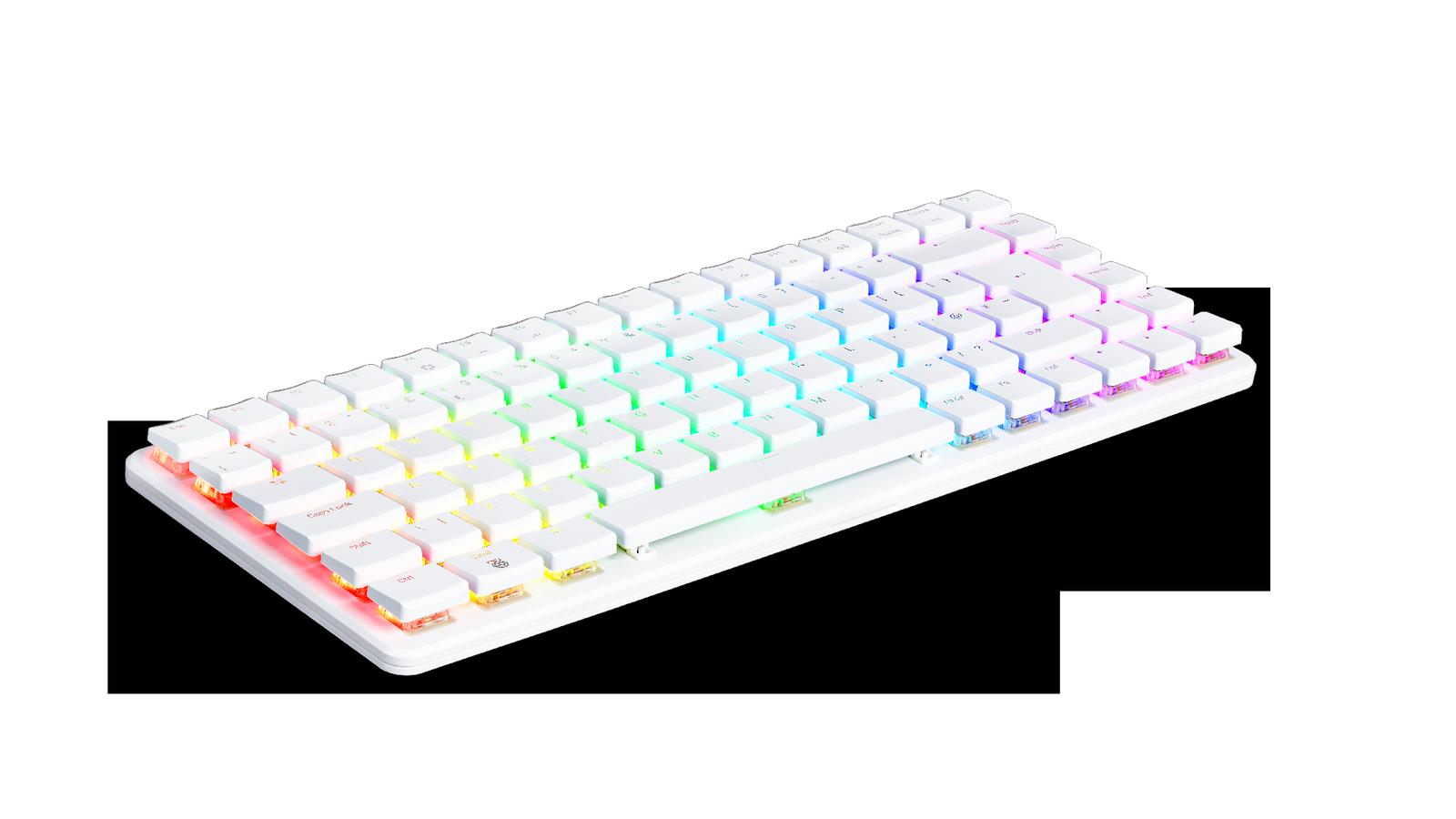
Raspberry Pi 500+ is a more serious version of the keyboard-computer idea: a Raspberry Pi desktop built into a mechanical keyboard, with 16GB of RAM and 256GB of NVMe storage included. For maker labs, STEM classrooms, coding benches, and lightweight control stations, that changes the evaluation from “cute all-in-one Pi” to “could this be a durable shared workstation?”
This is a spec review, not a hands-on test. TVG has not received a Raspberry Pi 500+ review unit and has not measured thermals, noise, keyboard durability, or classroom failure rates. The goal is to identify what the published specs suggest and what a lab should test before buying a cart of them.
Raspberry Pi’s official Raspberry Pi 500+ product brief describes the system as a premium computer built into a mechanical keyboard, powered by the same quad-core 64-bit Arm processor and RP1 I/O controller found in Raspberry Pi 5. The Raspberry Pi product page lists 16GB RAM and 256GB NVMe storage, while DigiKey’s maker coverage highlights the SSD, memory, and mechanical-keyboard shift.
What changed from the older keyboard-Pi idea
The original keyboard-computer appeal was simplicity. A student or maker could plug in a display, mouse, power supply, and network connection, then start coding without a separate case, keyboard, and cable bundle. Raspberry Pi 500+ keeps that basic format but raises the baseline with more memory and built-in NVMe storage.
That matters because many lab frustrations are not caused by CPU speed alone. They come from slow removable media, inconsistent classroom images, fragile cable assemblies, and workstations that take too long to restore after a failed experiment. Built-in NVMe storage could make the device feel less like a hobby board and more like a predictable lab endpoint.
Why 16GB RAM matters
For introductory programming, 16GB is more than enough. For modern maker-lab work, it is more interesting. Browser-heavy lessons, Python notebooks, light container experiments, local documentation, camera utilities, and microcontroller toolchains can consume memory quickly. A 16GB baseline gives classrooms more room before students hit swap or slowdowns.
It also makes the system more useful as a small control station. A Raspberry Pi 500+ could plausibly sit beside a 3D printer, CNC router, electronics bench, camera-review station, or robotics demo table. It is not a workstation-class PC, but it has enough memory to avoid many of the constraints that made older small boards feel cramped.
The NVMe question: convenience versus service path
Including 256GB NVMe storage is the most practical upgrade for labs. It reduces reliance on microSD cards, which are easy to lose, easy to corrupt through rough power handling, and awkward to manage at scale. For teachers and lab managers, a built-in SSD can simplify imaging, updates, and local project storage.
The tradeoff is service planning. Labs should ask how easily the storage can be reimaged, replaced, locked down, or backed up. If a student project breaks the software image, the recovery process matters more than the SSD brand. Raspberry Pi’s documentation for Raspberry Pi computers remains an important source for boot, storage, and configuration behavior.
Keyboard durability is not a small detail
Raspberry Pi 500+ uses a mechanical keyboard, which gives the device a more premium feel and may improve typing comfort. In a shared lab, though, the keyboard is also the chassis. If a key switch fails, a liquid spill happens, or the case takes a hit in a storage cart, the whole workstation is affected.
That is not a reason to reject the format. It is a reason to test it like lab equipment. A school buying one unit for a coding club has a different risk profile than a program buying 25 units for daily rotation. Keycaps, feet, cable sockets, USB ports, and power jacks should be treated as wear items during evaluation.
I/O planning: the hidden buying decision
A keyboard PC still needs a display, mouse, power supply, network path, and often a USB hub. For maker labs, it may also need a microcontroller connection, camera, serial adapter, storage device, or capture card. TVG’s portable monitor field-dashboard guide and HDMI capture-card guide are useful companions because the Pi 500+ is only as reliable as the bench around it.
Before buying, map the full cable path. Which display connector is used? Is wired networking required? Does the lab need USB ports for microcontrollers and storage at the same time? Will students plug and unplug devices daily? Small connector decisions can become classroom-management problems if they are not standardized.
What TVG would test first
- Thermal behavior: Run browser, coding, and light build workloads for a full class period and watch for throttling or uncomfortable case heat.
- Image recovery: Time how long it takes to restore a clean lab image after a broken install.
- Keyboard wear: Check key feel, stabilizers, feet, and case flex after repeated transport.
- Display setup: Confirm the exact monitors, adapters, and resolutions the lab will use.
- Peripheral load: Test microcontrollers, cameras, USB storage, and hubs together rather than one at a time.
- Student login model: Decide whether projects live locally, on network storage, or in Git repositories.
Who it fits
Raspberry Pi 500+ looks strongest for STEM classrooms, library labs, maker spaces, coding clubs, electronics benches, and small teams that want a tidy Arm Linux workstation. It is also interesting for clubs that already teach with Raspberry Pi hardware and want fewer loose parts.
It looks less ideal for workloads that need x86 software compatibility, GPU-heavy media work, large CAD assemblies, or heavy local AI inference. Those buyers may be better served by a mini PC or NPU laptop. TVG’s NPU laptop versus mini PC buyer evaluation covers that adjacent decision.
TVG Take
Raspberry Pi 500+ is compelling because it solves boring lab problems: storage, memory headroom, cable clutter, and setup consistency. The risk is assuming the keyboard-computer format automatically solves classroom operations. It does not. It simply moves the stress points into the keyboard, storage image, display path, and shared-use policy.
If TVG were evaluating it for a lab purchase, we would buy one or two units first, standardize a monitor and power setup, image them repeatedly, run a week of student-style workloads, and inspect physical wear. If the recovery process and connector behavior are clean, the Pi 500+ could be a neat and credible STEM workstation. If not, a cheaper Pi kit or small desktop may be easier to service.

That’s a really interesting take on the Pi 500+ – I hadn’t considered how it would translate to a more focused lab environment.
Thanks for reading — that lab fit is exactly the part we think matters most. The Pi 500+ looks most interesting when it is treated less like a general desktop replacement and more like a controlled classroom, bench, or documentation machine. The question is not only whether it is faster, but whether it makes setup, recovery, and repeat use easier for students or makers.