
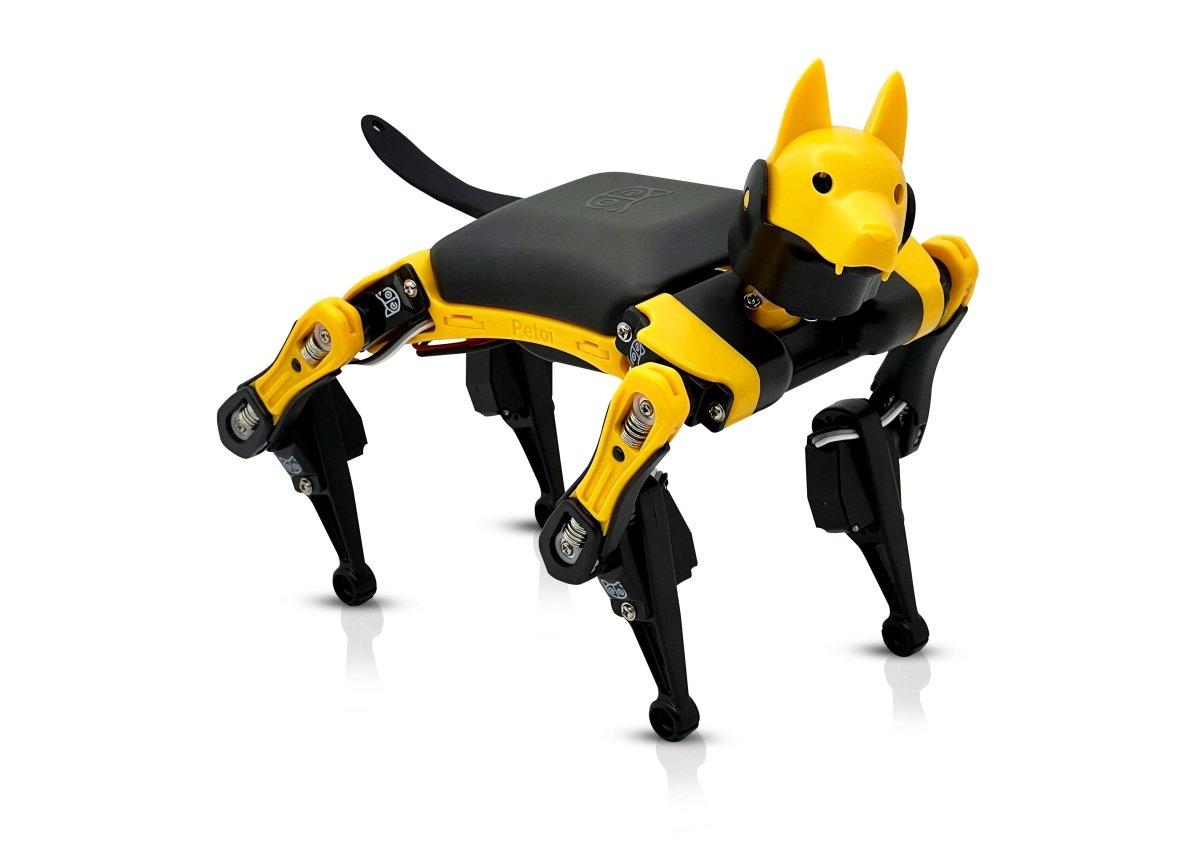
Petoi Bittle X sits between a novelty robot pet and a sealed education appliance. Petoi positions the palm-size quadruped as an open-source programmable platform for makers, classrooms and robotics developers, with ESP32 control, block/Python/C++ paths and optional sensors.
A small quadruped with an open control stack
Bittle X is Petoi’s programmable robot dog kit line for STEM and maker robotics. The official product page describes it as a DIY robot dog that can be built, coded in Python, C++, and Scratch-style tools, and used for AI-themed projects. The current specifications page lists a standing footprint of 190 × 153 × 107 mm, a weight range of 269–353 grams, nine servo-powered joints, a plastic frame, and Petoi’s BiBoard controller built around the ESP32-WROOM-32D.
The spec sheet also lists 520K SRAM, 16MB QSPI flash, 64Kbit external EEPROM, a six-axis IMU, 12 PWM channels, USB-C, serial UART, I2C, speaker, Bluetooth, Wi-Fi, and Raspberry Pi support through a dedicated socket. Battery information is practical rather than vague: Petoi lists a 7.4V 1000mAh Li-ion pack, typical/max current of 2A/5A, roughly one hour of battery life, and about 1.5 hours of charge time.
Why visible mechanics matter
The strongest fit is a maker, STEM lab, robotics club or small education team that wants visible mechanics and programmable behavior. Bittle X is more technically inspectable than many novelty robot pets because Petoi publishes learning paths, a guide center and an OpenCatEsp32 codebase tied to current BiBoard hardware.
It is probably less suitable for buyers who want a polished consumer robot companion with no maintenance, calibration, or programming burden. A small quadruped with servo joints, firmware, calibration, optional modules, and battery limits should be treated as a robotics learning platform first and a gadget second.
BiBoard, servos, and OpenCatEsp32
Several details make Bittle X credible as a teaching platform. The ESP32-based BiBoard provides wireless connectivity and more headroom than an older 8-bit controller. Nine servo joints expose gait, balance and calibration without the cost and risk profile of a large quadruped. Petoi also supports block programming, Arduino IDE workflows, Python serial control, desktop/mobile apps and curriculum material.
The OpenCatEsp32 repository is also important. It describes an open ESP32 quadruped framework for current Petoi hardware, including Bittle X and Nybble Q. That gives educators a way to inspect firmware, command APIs, examples and recovery paths instead of relying only on a closed demonstration app.
Calibration and support are the real workload
The biggest unknown is not whether Bittle X can perform impressive demos; the question is whether it stays teachable after repeated student use. Small servos, plastic frames, battery connectors, calibration offsets, and firmware drift can turn a good robotics kit into a support burden if the recovery path is not simple.
Voice and AI terminology requires care. Petoi’s pages describe voice-capable and AI-adjacent workflows, but buyers should distinguish offline commands, optional sound modules, cloud-free programming, camera or vision add-ons and any additional hardware required for stronger AI behavior. The exact kit variant, servo type, included modules and construction state affect both price and capability.
Which labs should consider it
Consider Petoi Bittle X if you want a compact quadruped platform for coding, gait experimentation, robotics education, or a maker lab where students can see the relationship between mechanical design and software behavior. It is especially interesting for programs that want to move beyond wheeled robot cars without jumping straight to expensive research quadrupeds.
Skip or delay it if your priority is zero-maintenance classroom deployment, long autonomous runtime, or guaranteed AI behavior without optional modules and setup work. In that case, a wheeled STEM robot or a simpler microcontroller kit may be a better first purchase.
Where Bittle X fits
Bittle X’s strongest attributes are an inspectable hardware stack, public documentation and enough mechanical complexity to expose real tradeoffs in calibration, gait and repair. Those qualities make it more useful as a legged-robotics learning platform than as a polished robot companion.
Its fit depends on the support model. A lab prepared to calibrate joints, manage batteries and replace servos can use Bittle X to move beyond wheeled robots; a classroom that needs long runtime and near-zero maintenance should begin with a simpler platform.

That’s a really interesting project. I’ve been looking for something like this to use with my students – the programmable aspect seems key.
Thanks for reading — the programmable side is the part that makes Bittle X most interesting for classrooms. A small walking robot is fun on its own, but the real value comes when students can connect code changes to motion, balance, sensors, and failure recovery.