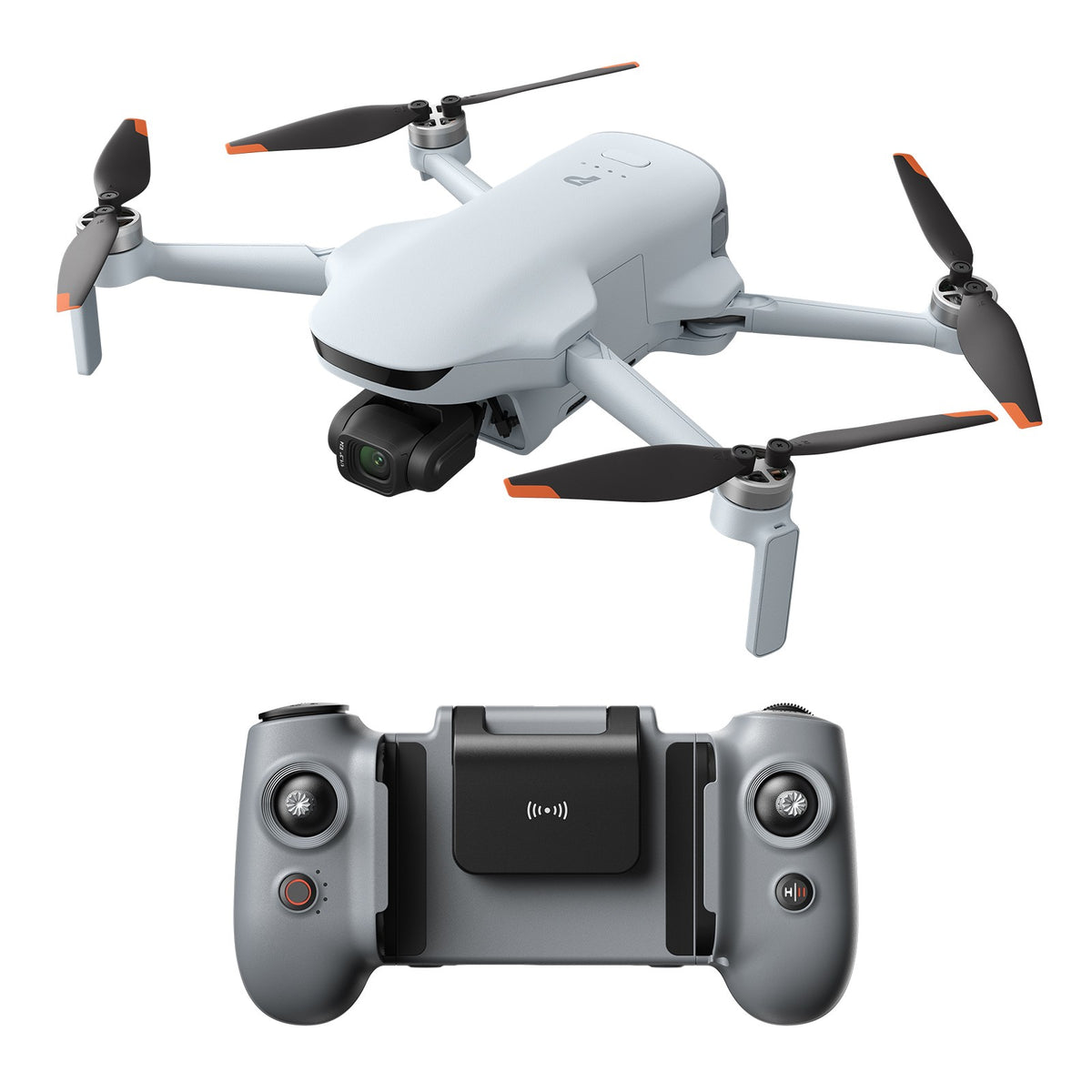
Potensic’s Atom 3 is arriving in the beginner-drone conversation with the usual attractive promises: compact size, creator-friendly camera modes, longer flight time, tracking features, and a controller workflow aimed at newer pilots. DroneDJ’s early review frames it as a meaningful step up for beginners, while Potensic’s own store page positions the Atom line around high-resolution camera capture, AI tracking, vertical shooting, and travel-friendly operation. That makes it a useful candidate for TVG’s expanded creator-and-field-tech lane.
TVG Report has not tested the Potensic Atom 3 hands-on and has not received a review unit, briefing, quote, or affiliate arrangement. This is a spec review and field-documentation checklist based on public information. A full review would require controlled flights, wind testing, log exports, app reliability checks, image-quality comparisons, and return-to-home drills.
Recent TVG coverage has looked at drone versus action camera documentation and camera sensor size for field teams. The Atom 3 should be judged against that same practical standard: not just whether it flies, but whether it creates reliable documentation for a student team, maker project, small inspection job, or creator workflow.
What looks promising on paper
The strongest appeal is that beginner drones now look less like toys and more like compact documentation tools. A usable 3-axis gimbal, predictable app workflow, return-to-home behavior, stable controller connection, and enough battery margin can make a small drone useful for build logs, outdoor testing, site walkthroughs, STEM demonstrations, and creator cutaways.
If Potensic’s camera and tracking claims hold up in ordinary field conditions, the Atom 3 could give new pilots a lower-friction path into aerial documentation. Vertical shooting is also relevant because many teams now document projects for short-form platforms as well as websites and reports. A drone that can switch between horizontal project footage and vertical social clips without awkward cropping is more useful than its price class might suggest.
Camera checklist: resolution is not enough
High-resolution recording sounds good in a headline, but field teams should evaluate exposure control, dynamic range, stabilization, rolling-shutter behavior, color consistency, and how well the footage survives compression. A drone used for robotics or maker documentation often flies over mixed surfaces: asphalt, grass, metal, bright sky, work tables, and people moving around a test area. That is harder than a clean sunset clip.
Before buying, ask whether sample footage includes harsh midday light, shaded areas, moving subjects, and modest wind. Also check whether still images and video files retain enough metadata for project documentation. Teams that archive flight footage should know the file format, bit rate options, storage workflow, and whether the app makes it easy to copy files without quality loss.
Flight time and battery claims need reserve math
Drone flight-time claims are usually measured under favorable conditions. Field teams should plan with reserve margin. If a drone advertises a long maximum flight time, that does not mean the useful mission time is the same. Wind, temperature, repeated climbs, active tracking, return-to-home reserve, and pilot caution reduce the real number.
A practical review would run the Atom 3 through repeatable missions: launch, climb, orbit a test subject, capture a static overhead shot, follow a walking operator, return, land, and log remaining battery. It would repeat that route with different wind levels and camera modes. The question is not whether the drone can hit a maximum number; it is whether it gives a beginner enough safe margin to finish a documentation pass without rushing.
Controller and app workflow are make-or-break
Beginner drones live or die by setup friction. The controller should connect quickly, the app should expose important warnings clearly, firmware updates should not surprise the user at the field, and return-to-home settings should be obvious before takeoff. If a new pilot has to dig through menus to set altitude, camera storage, tracking mode, or calibration status, the drone is less beginner-friendly than the marketing suggests.
For school clubs and small teams, account management matters too. Can multiple pilots use the same drone without confusing logs and settings? Are flight records exportable? Does the app work reliably on common Android and iOS devices? Does it require network access for features that should work at a test field? Those details affect whether the drone is a tool or a weekend gadget.
Tracking features should be tested conservatively
AI tracking is useful when it keeps a subject framed during a walkaround, robot test, or field demonstration. It is risky when buyers assume it can replace pilot attention. A real review should test tracking with predictable low-risk subjects first: a person walking across an open area, a slow ground robot, or a stationary build with a simple orbit. It should not be evaluated by pushing obstacle avoidance or flying near people.
Teams should also check how the drone behaves when tracking loses the subject. Does it hover, drift, search, or continue a previous motion? Does the app provide clear status feedback? A beginner-friendly drone should fail plainly and conservatively.
What TVG would test in a full review
- Cold setup time from case to takeoff-ready status.
- Firmware update behavior before a planned flight.
- Connection stability at short, medium, and legal visual-line-of-sight distances.
- Usable mission time with a conservative battery reserve.
- Wind behavior during static hover, orbit, and slow tracking shots.
- Video quality in harsh light, shade transitions, and moving-subject scenes.
- Return-to-home accuracy and warning clarity.
- Storage workflow, file naming, metadata, and transfer speed.
- Replacement battery, propeller, charger, and support availability.
Who should consider it
The Atom 3 looks most relevant for beginner creators, maker clubs, educators, and small teams that want a compact aerial documentation tool without jumping immediately into a higher-cost drone ecosystem. It may be less compelling for teams that need mapping accuracy, heavy wind tolerance, thermal payloads, remote operations, or enterprise support. Those buyers should look at a different class entirely.
Risks and unknowns
The main unknowns are real camera performance, app reliability, spare-part availability, and how well the tracking system behaves outside polished review conditions. Potensic has an opportunity here, but beginner-drone buyers should not confuse feature density with workflow readiness. The support path matters as much as the launch specs.
TVG Take
The Potensic Atom 3 should be judged as a field-documentation system, not just a beginner drone. If it can deliver predictable setup, conservative flight behavior, clean footage, easy file transfer, and available spares, it becomes interesting for creators and STEM teams. If the app, battery reserve, or support chain is weak, the impressive spec list will not matter after the first missed flight day.