A microSD card can report its advertised capacity to the operating system and still contain much less physical flash. To verify the claim, write test data across the card’s free space with F3 and read every test sector back; checking the label, formatting the volume or copying one small folder does not exercise the full address range.
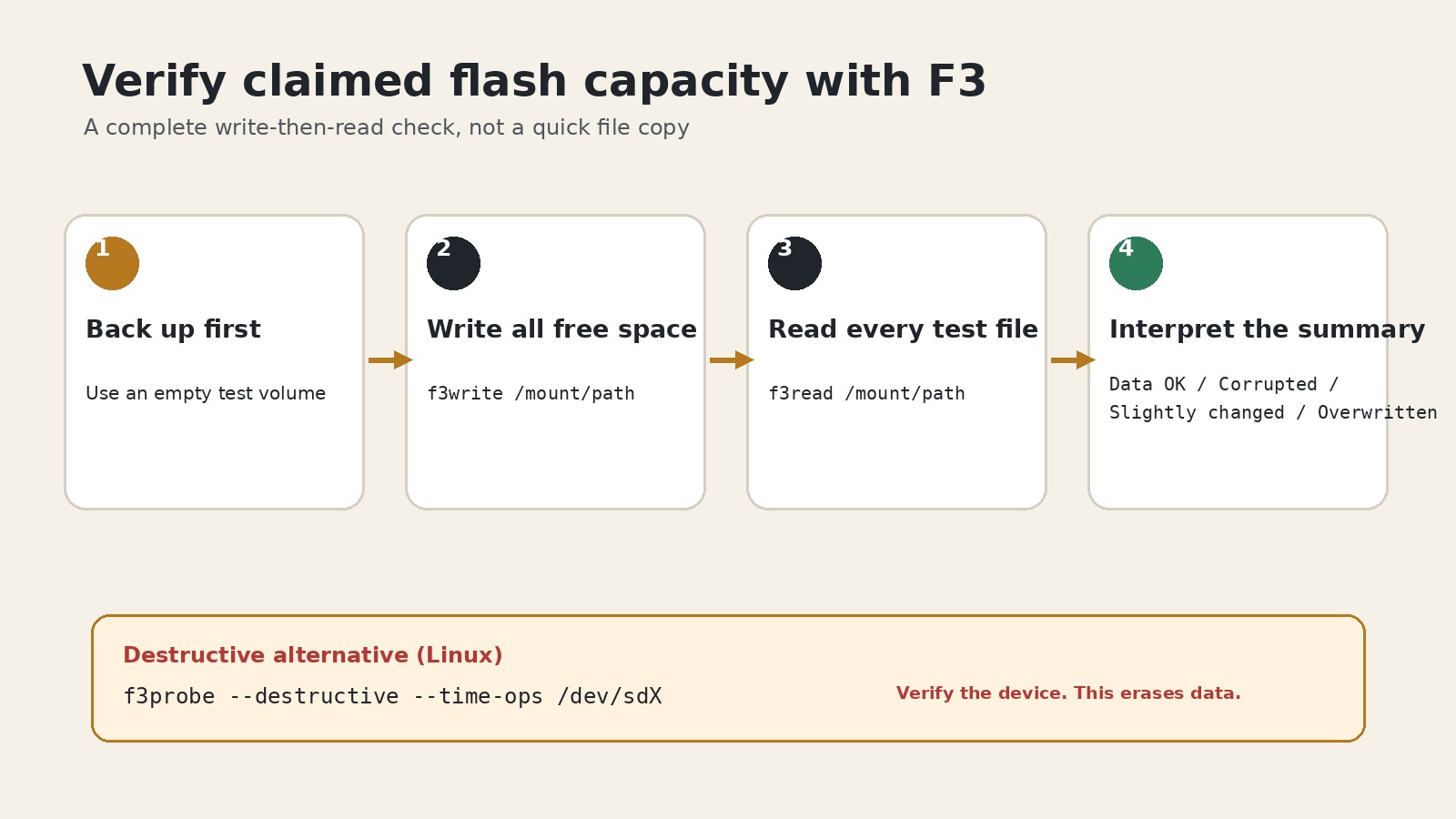
This procedure follows the F3 project’s version 10.0 README and its version 8.0 usage documentation. It is intended for an empty test card. Back up anything valuable first, because false-capacity media can alias later writes onto earlier addresses and destroy files that appeared safe.
Identify the mounted card, not just its advertised size
Insert the card through a known-good reader and use lsblk -o NAME,SIZE,MODEL,SERIAL,FSTYPE,MOUNTPOINTS on Linux to identify the device and its mounted partition. Compare the output before and after insertion. The mount point might resemble /media/user/CARD; the block device might resemble /dev/sdb. Those are not interchangeable inputs.
f3write and f3read take the mounted directory. The faster f3probe takes a raw block device and can destroy its contents. If the device identity is uncertain, stop rather than substituting the largest-looking path.
Write all free space, then read it back
Unmounting is not required for the filesystem test. With the card mounted and empty, run:
f3write /media/user/CARD
f3read /media/user/CARD
According to the F3 documentation, f3write fills free space with 1 GB files named N.h2w; the last file can be smaller. f3read then checks whether those files contain the expected pseudorandom data at the expected positions. Run the read step after the write step completes and before deleting the test files.
f3write avoids ordinary existing filenames, but that does not make a non-empty card safe. The documentation’s fake-card example shows later test writes destroying data in earlier .h2w files because the controller remapped or wrapped addresses. Existing personal files can be exposed to the same underlying failure.
Read the counters as address evidence
F3 evaluates 512-byte sectors and reports four categories. Data OK came back with the expected contents from the expected logical position. Corrupted data did not match. Slightly changed means the sector appeared in the right position with a small number of flipped bits. Overwritten means recognizable test data returned from a position other than the one where F3 placed it.
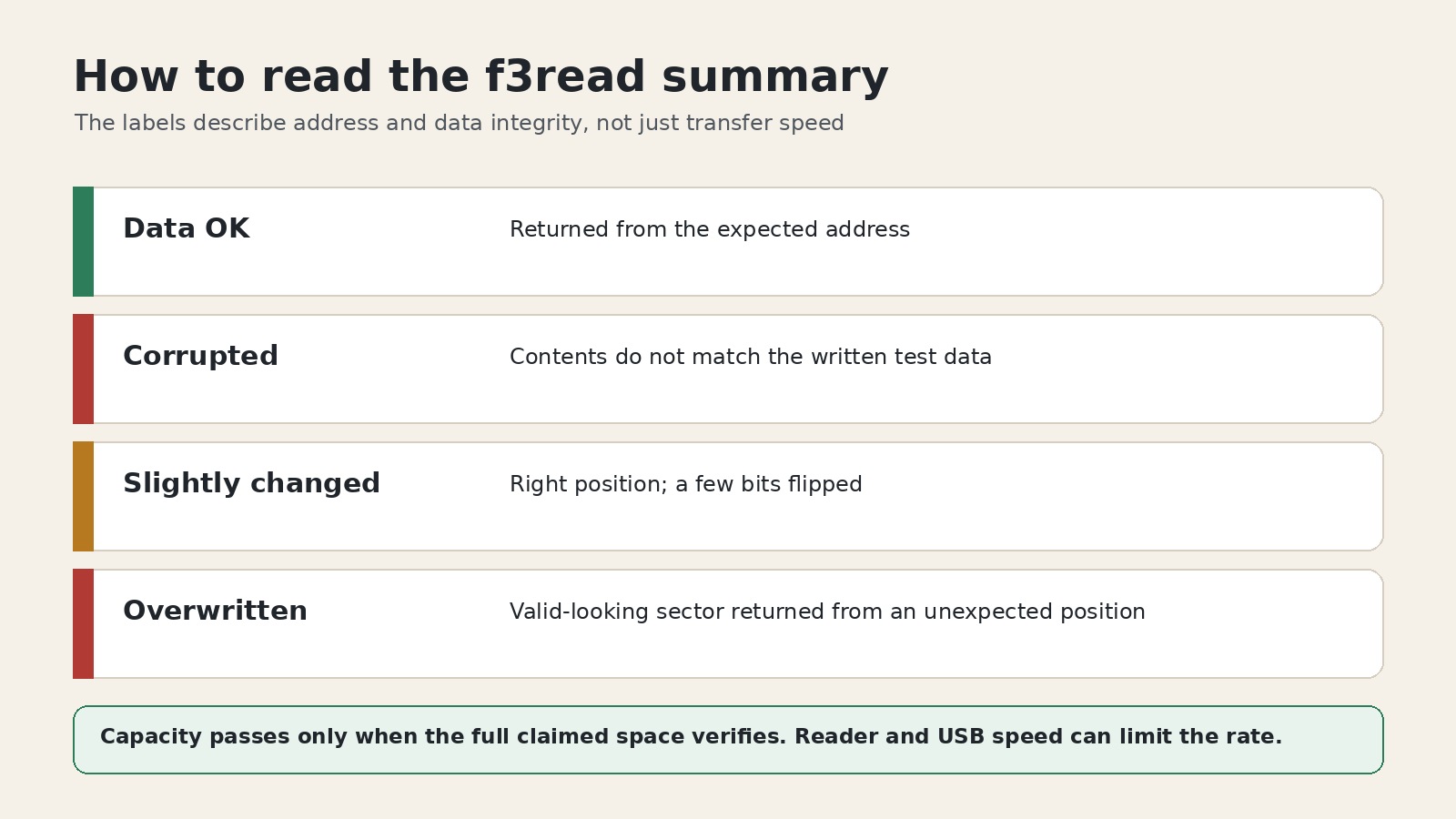
The last case is especially important for false capacity. A controller can acknowledge logical addresses beyond its real flash and map them onto storage already used by earlier files. The copy operation looks successful; only full-address verification reveals that writing later data damaged earlier data.
A card passes the capacity claim only when the full tested range reads back without lost sectors. Do not reinterpret a large “Data LOST” value as a speed problem. Speed can affect how long the test takes, but it does not explain deterministic mismatches or address aliasing.
Use the destructive probe only when the target is certain
On Linux, F3 also provides a quicker raw-device test:
sudo f3probe --destructive --time-ops /dev/sdXReplace /dev/sdX with the verified card device, not a partition guess, and unmount all of its partitions first. The command is explicitly destructive. It is appropriate only when the card contains nothing needed and the operator has positively excluded the system disk and every other removable drive.
F3’s f3fix can create a partition that fits the usable area reported by f3probe, but that does not turn fraudulent or unstable media into trustworthy primary storage. A controller that lies about capacity has already failed a basic trust boundary; replacement and seller reporting are safer than redeployment for important data.
Capacity, speed and endurance are separate questions
The F3 summary includes estimated read and write rates, but its documentation warns that the reader, USB port and other host processes can limit those numbers. A clean capacity result therefore does not certify a V30 claim, sustained camera write workload or long-term write endurance. Those require separate workload-appropriate tests.
TP-Link’s current guidance describes the common failure as a smaller card reprogrammed to appear larger—for example, 32 GB presented as 128 GB—and warns that data beyond the physical capacity becomes unavailable. The useful response is not another format. It is a complete write-and-read verification before the card carries the only copy of anything.