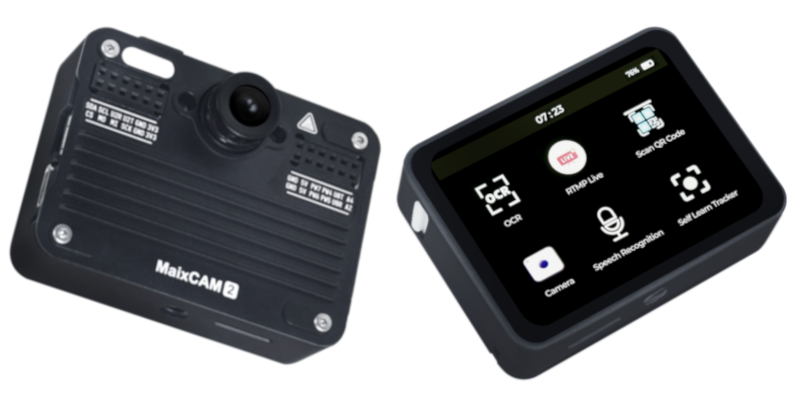
Sipeed’s MaixCAM2 sits between a compact smart-camera module and a small Linux edge-AI computer. Its pitch is unusually broad: a dual-core Arm processor, an NPU, replaceable M12-lens camera options, a touchscreen, audio, wireless networking, hardware video codecs, and Python or C++ development in a package intended for prototypes, robots, machine-vision experiments, and education.
That integration is promising, but it also makes the product more demanding to evaluate than a headline TOPS figure suggests. This source-based engineering preview separates the documented hardware from the practical considerations buyers should confirm before choosing a configuration.
Disclosure and review-unit status
TVG has not received a review unit for this article; this analysis is based on manufacturer specifications, official product information, public documentation, and TVG’s engineering review criteria.
No hands-on performance, thermal, image-quality, latency, power, or reliability claims are made here. Sipeed’s benchmark figures are identified as manufacturer claims rather than independent TVG results. Product configurations, camera modules, memory, storage, accessories, and availability may differ by seller or bundle, so buyers should confirm the exact SKU before ordering.
Product summary
MaixCAM2 is an edge-AI camera platform built around Axera’s AX630C. Sipeed documents two 1.2GHz Cortex-A53 cores running Linux, an E907 RISC-V core running an RTOS, and an NPU rated at 12.8 TOPS at INT4 or 3.2 TOPS at INT8. Memory is offered in 1GB and 4GB LPDDR4 configurations. Official documentation also describes 32GB eMMC-equipped versions, while the quick-start guide notes that versions without eMMC boot from a TF card.
The platform combines that compute layer with a 2.4-inch 640×480 capacitive touchscreen, dual microphones, a 1W speaker, Wi-Fi 6, Bluetooth 5.4, USB 2.0 host/device support, a six-axis IMU, an RTC, and a PMOD-style expansion interface. Camera support reaches up to 8MP and 4K at 30 frames per second in documented configurations, with H.264, H.265, and MJPEG hardware encoding.
Sipeed’s software route is as important as the silicon. MaixPy’s official MaixCAM2 quick start covers first boot, built-in applications, MaixVision connectivity, camera access, object detection, and sending results over UART to another controller. Developers who need lower-level control can use the company’s C++-based MaixCDK rather than treating the device as a closed appliance.
Who it is for
- Robotics teams that want local perception plus UART, I2C, SPI, PWM, or network output without pairing a separate SBC and accelerator.
- STEM labs and university courses that need a visible camera-to-model-to-output workflow and can benefit from Python-first development.
- Machine-vision prototypers evaluating compact inspection, counting, tracking, OCR, or classification concepts before designing custom hardware.
- AI-camera builders who value M12 lens choice, hardware video codecs, a built-in display, and the option to move from MaixPy to C++.
It is less obviously suited to buyers who need a certified industrial camera, deterministic hard-real-time control, a guaranteed long-term software-support window, or an out-of-box result without camera, optics, model, and thermal validation.
Technical specs and design signals
| Area | Officially documented specification or design signal | Engineering implication |
|---|---|---|
| Compute | AX630C; dual 1.2GHz Cortex-A53 Linux cores plus E907 RISC-V RT core | Linux application flexibility with a separate real-time-oriented core, but integration quality must be tested. |
| AI acceleration | 12.8 TOPS INT4 / 3.2 TOPS INT8; convolutional and transformer model support | Precision, operator support, preprocessing, and memory can matter more than the peak number. |
| Memory and storage | 1GB or 4GB LPDDR4; configuration-dependent eMMC/TF-card boot options | The exact SKU will affect model headroom, boot behavior, recovery, and sustained logging. |
| Camera path | Four-lane MIPI CSI; up to 8MP/4K at 30fps; split dual-CSI support | Sensor choice and ISP tuning are central to the result, not interchangeable accessories. |
| Video | H.264, H.265, and MJPEG hardware codecs; 4K30 encode and 1080p60 decode listed | Useful for smart-camera builds, subject to end-to-end latency, quality, and thermal tests. |
| Display and audio | 2.4-inch 640×480 touch display, dual mics, onboard amplifier and 1W speaker | Good for self-contained demos and setup, while adding power and enclosure variables. |
| Connectivity | Wi-Fi 6, BLE 5.4, USB 2.0 host/device, optional Ethernet through an FPC adapter | Flexible deployment, but wired and wireless throughput should be measured under load. |
| Expansion | PMOD-style interface with 20 I/O plus common I2C, SPI, UART, ADC, and PWM functions | Promising for robot integration; pin mapping, logic levels, and simultaneous peripheral use need verification. |
The official camera and lens guide is a positive design signal because it does not pretend that every sensor behaves alike. It lists OS04D10, SC850SL, and OS04A10 options with different resolution, pixel size, dynamic-range, field-of-view, thermal, and low-light tradeoffs. The supplied M12 lenses are manual-focus, fixed-focal-length designs. That makes the platform more adaptable, but also means a meaningful review must identify the exact sensor and lens rather than report “MaixCAM2 image quality” as one universal result.
Sipeed claims up to 113fps for YOLO11n at 640×640 on the NPU. That figure describes manufacturer-reported model throughput rather than complete application performance. A robot or inspection camera also has to handle capture, color conversion, resizing, inference, post-processing, display or encoding, and output transport.
Who should consider it
MaixCAM2 deserves consideration from experienced makers, university teams, robotics clubs, and prototype engineers who want more local AI headroom than a microcontroller-class vision sensor provides, but prefer a more integrated starting point than assembling a camera, SBC, accelerator, display, microphones, and power system separately.
Buyers should first choose the actual workload, sensor, lens, memory tier, and output path. A classroom object detector, a moving robot, and a fixed inspection camera create different optical and thermal requirements. For critical automation, treat MaixCAM2 as a development platform until repeatability, fail-safe behavior, electrical integration, environmental limits, and lifecycle support are proven for the deployment.
TVG Take
MaixCAM2’s strongest feature is not its TOPS rating in isolation; it is the attempt to package camera input, local AI, display, audio, networking, codecs, expansion, and an approachable Python workflow into one compact platform. The official documentation’s explicit sensor and lens tradeoffs are also more useful than a generic “4K AI camera” label.
The practical value of that breadth will depend on the intended workload and exact configuration. For builders comfortable selecting and validating their own sensor, lens, software stack, and integration path, MaixCAM2 is a technically interesting development platform for robotics and machine-vision prototypes.
Sources
- Sipeed MaixCAM2 official introduction, specifications, ecosystem, and resources
- Sipeed MaixCAM2 official camera and lens selection guide
- Sipeed MaixCAM2 MaixPy quick-start guide
- Sipeed MaixCAM2 official FAQ
- Sipeed MaixPy official source repository
Featured image: official Sipeed product image from the manufacturer’s MaixCAM2 documentation, uploaded to TVG Report for this article.