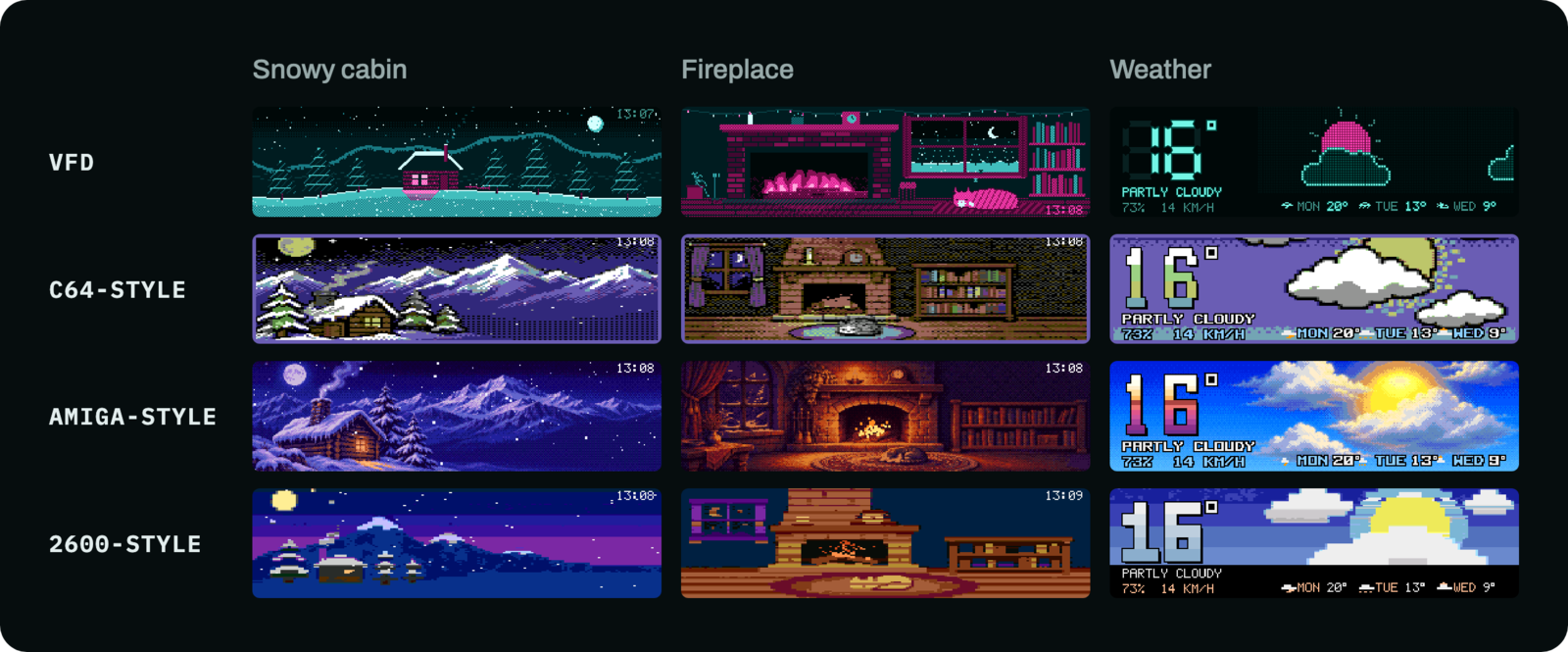
Owners of Waveshare’s ESP32-S3-Touch-LCD-3.49 can turn its 640×172 screen into a retro clock, internet radio and playful desk companion with Phosphor. Its blackjack game uses the board’s motion sensor to feel knocks through the desk: once to stand, twice to hit, with touchscreen buttons as an alternative.
CNX Software highlighted the project on November 27. The firmware is already into its second major version: v2.0.0 arrived on November 22, and the latest listed release is v2.0.3, dated November 24.
Four looks, drawn differently
Phosphor offers VFD, C64-style, Amiga-style and Atari 2600-style presentations. These are visual treatments, not emulators. The developer redraws scenes around different resolution and palette constraints: 16 colors for C64-style, 32 from 4,096 for Amiga-style, and four per line for 2600-style.
The comparison above shows snowy cabin, fireplace and weather screens across all four looks. The differences extend from typography to the scenes themselves.
Screens: Melih Koray / Phosphor.
Touch and motion give those scenes something to do: tilting the board tilts the sea beneath an ocean liner. Clock, weather and timers cover everyday duties, while the radio accepts MP3 and AAC streams, with station discovery through Radio Browser.
Check the board before flashing
The browser installer needs desktop Chrome or Edge and a USB-C data cable. Development and testing used the V2 board, identified by a V2 case sticker and Rev1.1 on the PCB. V1 compatibility remains unconfirmed. Version 2.0.1 fixed V2 brightness control after Waveshare moved the backlight to another pin.
Installing replaces the current program, including Waveshare’s factory demo; Phosphor neither backs it up nor restores it. For a first installation, the developer instructs users to tick Erase device.
Existing Phosphor v1.0.x users need a different choice: install v2 once over USB with Erase device unticked to retain Wi-Fi and other settings. That USB step is required because v2 changed the flash layout, adding larger application slots and a separate pictures-and-fonts pack.
Local control means trusting the Wi-Fi
Setup joins a 2.4 GHz Wi-Fi network, and local control uses plain HTTP. Anyone on the same Wi-Fi can change pages, radio, brightness and messages without a password. The developer explicitly warns against exposing the device to the internet; this is a control surface for a trusted home network.
Published builds contain no OTA_TOKEN, so network firmware updates, renaming and Wi-Fi reset are disabled. A custom build configured with a token differs. The daily HTTPS version check only announces an available update; it never installs one automatically.
No cloud account is required, but online features still contact services: Open-Meteo weather uses plain HTTP, alongside NTP time servers and the chosen radio streams.
The firmware is free under GPL-3.0. CNX’s November 27 report put the board at $29.99–$31.99 on Waveshare’s store. For owners of this exact display, it offers a ready-made desk project; adapting it to another screen is less straightforward, with CNX noting hardcoded values that hinder other resolutions.