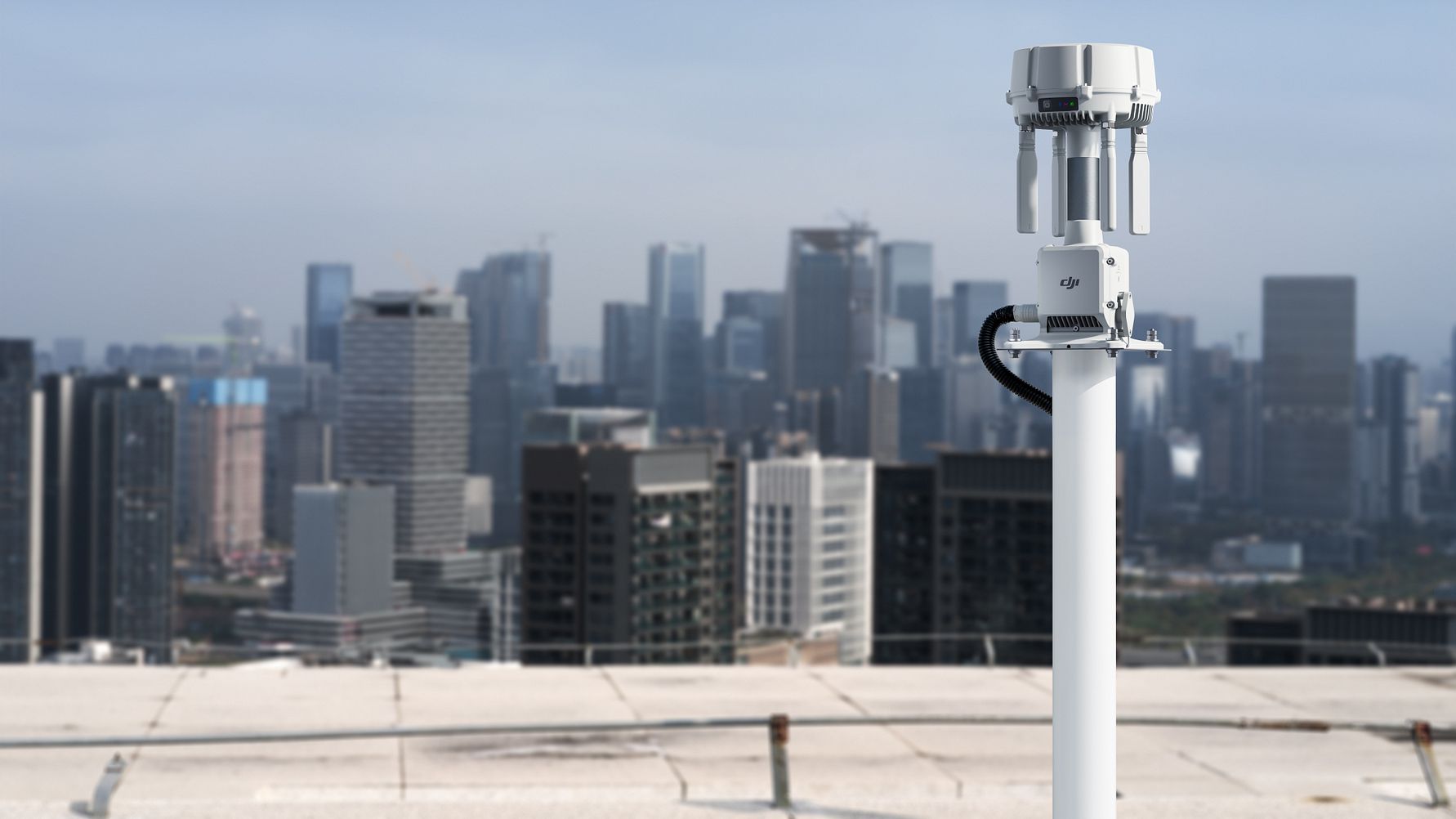
DJI’s O4 Ground Station sounds, at first, like a range accessory for enterprise drones. The more interesting story is what it says about DJI Dock 3 deployments: the hard part is often not flying farther, but making a site behave predictably enough for repeat operations.
After TVG Report’s earlier coverage of DJI O4 Ground Station and enterprise drone link reliability, DJI followed up with more detail on how enterprise teams should think about Dock 3 deployments. The answers make the product feel less like a simple booster and more like a way to turn messy site conditions into something operators can actually plan around.
The problem starts before the hardware goes up
For enterprise drone teams, Dock 3 is supposed to make routine missions less dependent on a person standing next to the aircraft. That only works if the site cooperates. A yard with metal structures, a port with moving equipment, a utility corridor with terrain changes, or a campus with buildings in the wrong place can all make a clean-looking deployment less predictable than it seems on paper.
That is where O4 Ground Station becomes more interesting than a spec-sheet range claim. DJI’s guidance starts with Signal Map, then moves into site survey and environmental review. In plain English: look at what the aircraft is actually seeing, then decide where additional radio support makes sense.
That may sound obvious, but it is a useful reminder. In drone operations, teams can get pulled toward hardware-first thinking. Put the dock here. Mount the accessory there. Solve the coverage issue later. DJI’s follow-up points in the opposite direction: read the site first.
Signal Map is the feature to watch
DJI says Signal Map is built from actual flight records and stored per device. It uses a hex-grid layout of about 75 meters per side, and the relevant zones refresh after missions. That makes it more than a planning screenshot from installation day.
The practical value is that teams can compare what they expected with what happened in the field. If a route repeatedly shows weak transmission behavior, the map gives operators a reason to revisit station placement instead of guessing. If coverage improves after a change, the system has a record that can be checked against future missions.
For TVG readers, this is the part that matters most. A radio accessory is only useful if it reduces uncertainty. Signal Map gives teams a way to see whether O4 Ground Station is solving the right problem or just adding another device to the deployment.
Relay Mode is the local fix
DJI’s Relay Mode is the easier case to understand. It is meant for a local coverage problem near Dock 3. DJI describes one elevated relay, within about 1 kilometer line of sight, as a way to help when an obstruction near the dock limits the work area.
The notable detail is that Relay Mode can work without onsite internet. The ground station routes data through the dock, which makes it a better fit for locations where the dock already has the needed connection but the immediate radio environment is awkward.
Think of a dock placed near a building, tree line, ridge, yard corner, or industrial structure. The aircraft may not need a complex network of stations. It may just need a better local path around one bad piece of site geometry.
Gateway Mode is a different kind of deployment
Gateway Mode is the broader design. DJI says it is suited to a network of stations around Dock 3. It is cloud-connected, does not require binding to a dock, and does not carry the same distance or line-of-sight framing because each station connects to the cloud directly.
That changes the story. Relay Mode feels like a correction for a specific obstruction. Gateway Mode feels more like planning coverage across a larger property. It also raises a different set of questions: where does each station get network access, how stable is that connection, and how much of the site really needs distributed coverage?
This is where O4 Ground Station stops being an accessory decision and becomes a site-design decision. The same product can play two different roles depending on whether the team is solving a local blind spot or building a wider operating area.
The unglamorous details still matter
DJI also pointed to the installation details that rarely make a product sound exciting: PoE, network access for Gateway Mode, lightning-protection coverage, and proper grounding.
Those details are not filler. A station mounted high enough to help coverage is also exposed to weather and electrical risk. A PoE run that looks simple indoors can become a real installation constraint outdoors. A Gateway Mode design that depends on cloud connectivity is only as strong as the network path at each station location.
This is where enterprise drone systems often become less glamorous than the demo video. The aircraft and dock get the attention, but the deployment is only as reliable as the power, cabling, mounting, grounding, and network decisions behind it.
What teams should take from DJI’s follow-up
The best use case for O4 Ground Station may not be defined by industry. It is more likely defined by site shape. Industrial yards, ports, utilities, construction sites, campuses, remote facilities, and emergency-management locations can all have the same basic issue: Dock 3 is useful, but the site is not radio-friendly everywhere the aircraft needs to work.
That makes O4 Ground Station worth watching for teams that can point to a specific coverage problem. If Signal Map data and a site survey show a local obstruction, Relay Mode is the cleaner starting point. If the property needs broader station coverage, Gateway Mode may be the more serious option — but it also brings more network planning.
The risk is treating the product like a universal range upgrade. DJI’s own details suggest a narrower and more useful reading: O4 Ground Station is for teams that are ready to study the site, place the station deliberately, and check the results after real missions.
TVG Take
DJI’s follow-up makes O4 Ground Station look less like a plug-in upgrade and more like a diagnostic tool for Dock 3 deployments. The important questions are not just “how far can it reach?” but “what is blocking the route, which mode fits the site, and can the team prove the setup is working after missions?”
That is a more grounded story than a simple range claim. If enterprise drone operations are going to move from demos to repeatable field work, products like this will be judged by whether they make messy locations easier to understand — not just by whether they add another line to the spec sheet.
Sources
- Technical details provided by Grant Hosticka, Head of Enterprise Solution Engineering for North America at DJI.
- TVG Report: DJI O4 Ground Station Makes Drone Links a Field Reliability Question