A nonzero NVMe unsafe_shutdowns count does not mean the same thing as a media error, and percentage_used is not a universal health score. Read the SMART/Health log as a set of separate signals: current critical-warning bits, media/data-integrity errors, power-loss history, endurance estimate, temperature exposure and the number of error-log entries.
Featured image: Dmitry Nosachev/Wikimedia Commons (CC BY-SA 4.0; cropped to 16:9).
Capture the controller log before interpreting it
On Linux, list the devices and save machine-readable output:
sudo nvme list
sudo nvme smart-log /dev/nvme0 --output-format=json   > nvme0-smart-$(date +%F).json
sudo nvme error-log /dev/nvme0 --log-entries=64
The nvme-cli smart-log manual says the command retrieves the NVMe SMART log page for a device or namespace. Use the controller path such as /dev/nvme0 for a controller-wide baseline unless the device documents meaningful namespace-specific data.
Critical warning is current state; counters are history
The NVM Express Base Specification 2.2 defines the SMART/Health Information log as Log Identifier 02h. Its critical-warning field is a bit mask for current conditions such as available spare below threshold, temperature outside a reliable range, degraded subsystem reliability, media placed in read-only mode or failure of the volatile-memory backup device.
A zero critical-warning value does not erase historical counters. Conversely, one historical unsafe shutdown does not assert that NAND media failed. Save the entire log before power-cycling or changing firmware so later readings can be compared to the same field definitions.
Unsafe shutdowns record a missing shutdown notification
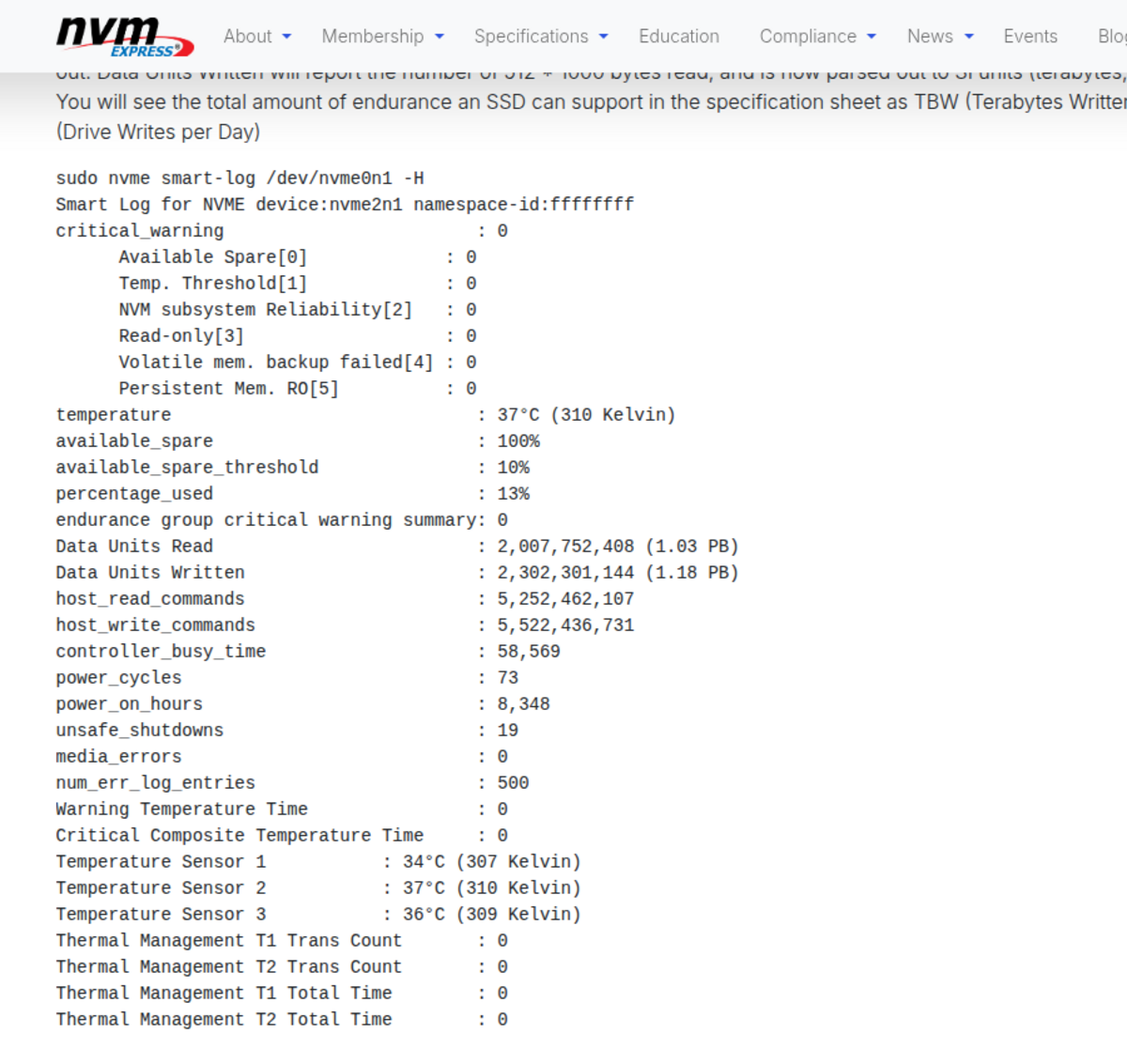
NVMe defines the unsafe-shutdown counter as the number of power-loss events where the controller did not receive a Shutdown Notification before power was removed. That can point to abrupt power removal, a hard reset, a battery or power-path problem, or platform behavior. It is evidence about shutdown sequencing—not a direct count of corrupted files and not a substitute for filesystem or application-level integrity checks.
Trend the counter. If it rises during controlled shutdowns, inspect firmware, power management and the physical power path. If it rises only when a field logger loses supply, improve hold-up power and shutdown handling. In either case, verify the stored data independently; the counter cannot tell which file, if any, was damaged.
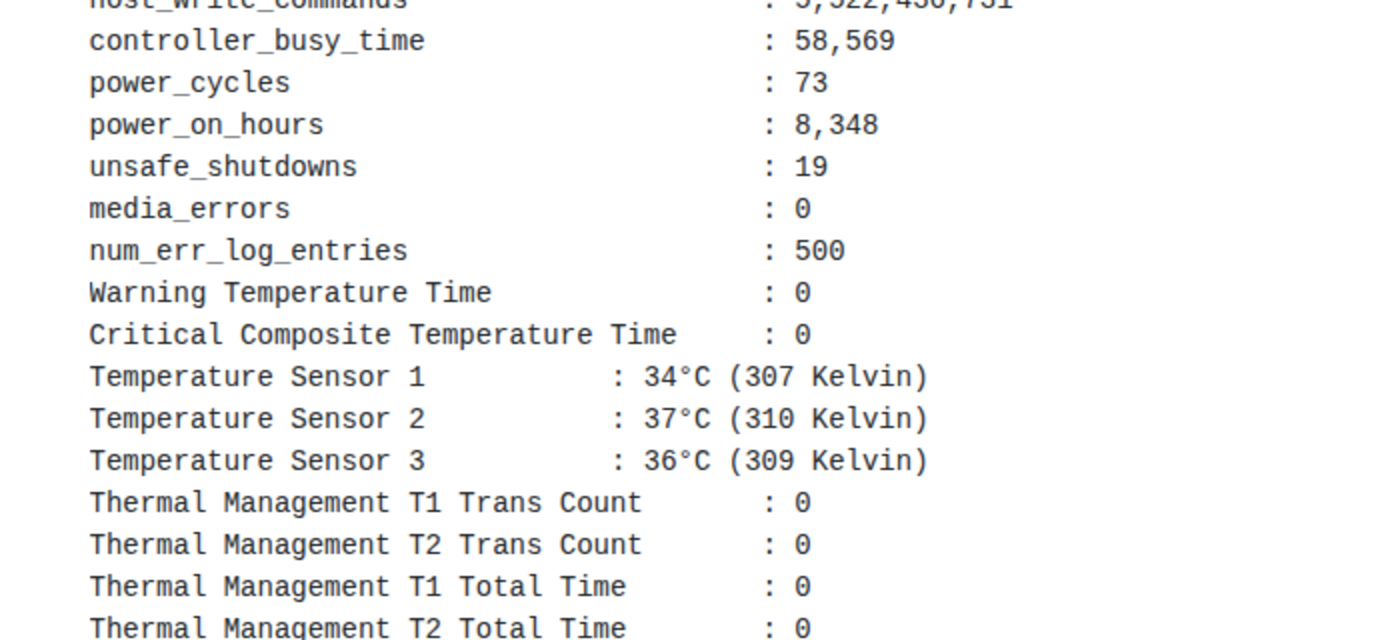
unsafe_shutdowns, media_errors and num_err_log_entries. Image: NVM Express.Media errors and error-log entries answer different questions
The media/data-integrity field counts occurrences where the controller detected an unrecovered data-integrity problem, including unrecovered ECC, CRC checksum failure or LBA tag mismatch as defined by the command set. A new nonzero increment is materially different from an unsafe-shutdown increment: preserve important data immediately, capture the error log and identify the namespace and logical block address when the entry provides them.
The number of error-log entries is broader. NVM Express describes an Error Information log that records command errors and their queue, command identifier, status and affected LBA/namespace where applicable. Unsupported or malformed administrative commands can add entries without proving worn-out flash. Correlate the status code and time of increase; do not equate num_err_log_entries with media_errors.
Endurance and temperature require context
percentage_used is a vendor estimate of life consumed relative to the endurance design point and may exceed 100. It is not a countdown that guarantees failure at a particular value. available_spare belongs beside its threshold, while composite temperature and warning/critical temperature time reveal thermal exposure rather than remaining write endurance.
NVM Express’s SSD failure and logging overview recommends combining the SMART log, error log and telemetry rather than relying on one field. For a workstation, NAS or robot logger, the useful record is a sequence of timestamped JSON snapshots plus backup and restore evidence.
An evidence-based response order
- Back up immediately if critical warning indicates degraded reliability/read-only state or if media errors are increasing.
- Save SMART and error logs before changing power, firmware or slot.
- Compare counter deltas across a known workload and controlled shutdown.
- Investigate unsafe-shutdown growth through the power and shutdown path; investigate media-error growth through data preservation, device diagnostics and replacement planning.
- Verify files or backups independently—the controller log is not a file-integrity report.
The central boundary is simple: power-loss counts, media-integrity failures, command errors and endurance estimates are not interchangeable. Keep them separate and the log becomes diagnostic evidence instead of an alarming but ambiguous health screen.