
Prusa Research is releasing the first public preview of PrusaSlicer 3.0 on September 1, exactly fifteen years after the first Slic3r commit. The new version replaces the user interface and changes how the slicer handles projects, printer profiles, plugins and online services.
This is an unfinished alpha, not a nearly complete release candidate. Prusa says the preview does not yet match every feature in PrusaSlicer 2.9.6, and some functions will not return until 3.1.0. Version 3.0 keeps its profiles in a separate directory, so it can run alongside 2.x without overwriting an existing setup.
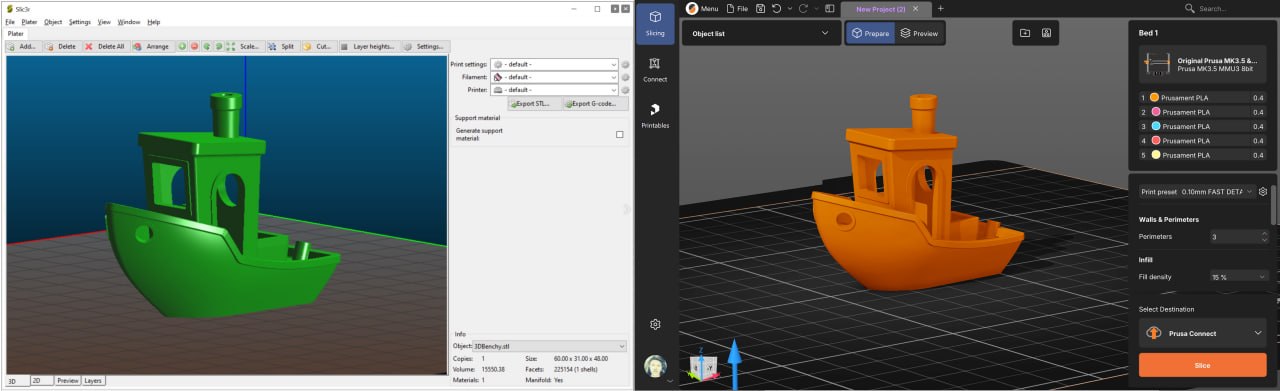
A new interface built around the active task
The 3.0 interface puts its main tools at the top, a collapsible scene browser on the left and a contextual panel on the right. That panel switches between bed profiles, object settings and active tool controls instead of showing one fixed stack of options.
The viewport adds a View Cube, light and dark themes, and mouse-navigation schemes modeled on Tinkercad, Blender, SolidWorks and Fusion. G-code preview now has a basic view for quick checks and an inspection mode for closer analysis. Individual settings can be marked as favorites and kept in the right panel.
Prusa also says dense scenes will remain more responsive by temporarily hiding toolpaths while the camera is moving, then restoring them when movement stops. Shadows, reflections and ambient occlusion can be disabled for older GPUs or for users who prefer the classic view.
Multiple beds become independent project units
PrusaSlicer 2.9 introduced up to nine beds in one scene, all using the same print settings. Version 3.0 removes that limit and gives each bed its own printer, configuration and profiles. A project can therefore contain an MK4S job and an XL job side by side, with beds sliced independently and processed in parallel.
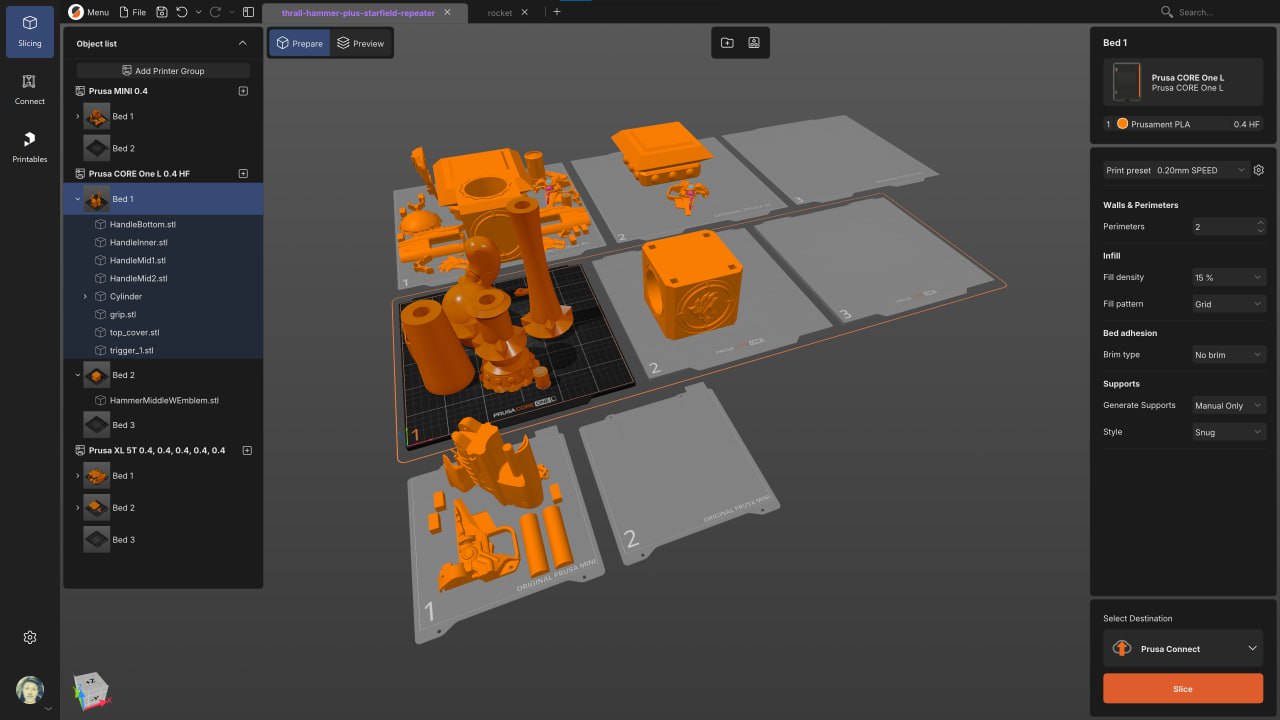
Multiple projects can remain open as tabs in one application window. Each tab keeps its own dialogs, selections and active tools. PrusaSlicer also continuously backs up open projects to a local backup_projects folder so work can be recovered after a crash.
Profiles now account for different tools
The profile system has been rebuilt around layers. On a multi-tool printer such as the Prusa XL, each tool can use a different nozzle and even a different print or printer profile without forcing the user to maintain several nearly identical machine configurations.
Prusa is moving the profile format from INI to YAML and has rewritten the preset updater to manage online and local preset sources in one place. The company says PrusaSlicer 2.x 3MF projects will load with both geometry and settings, while modified values remain identified as modified.
Compatibility works differently in each direction
A PrusaSlicer 3.x project opened in 2.x keeps its geometry but loses its 3.x settings; PrusaSlicer 2.9.1 and later should warn the user. Third-party 3MF files from OrcaSlicer or Bambu Studio are imported as geometry only. STL, OBJ and STEP files continue to work as normal.
That asymmetry makes a separate test copy important. Automatic conversion into 3.0 does not mean a fully configured 3.0 project can return intact to 2.x.
Lua plugins start with a narrow API
PrusaSlicer 3.0 introduces Lua plugins inside a sandbox. According to Prusa, plugins have no general disk access, cannot read data outside the loaded project and cannot use HTTP, sockets or other network communication.
The preview includes Flow Tower and Temperature Tower generators. The current experimental API is mainly designed to add generated objects to a scene; it cannot broadly manipulate everything already in the project. Prusa expects breaking API changes and plans to add more plugin types later. A reviewed community marketplace is also planned for a subsequent release, while manually installed unverified plugins remain the user’s responsibility.
The setup screen offers an Offline workflow that disables cloud features and switches profile updates to manual while retaining local-network printing. More granular controls remain available in Application Preferences. Prusa says a stricter full-offline configuration can disable all online services before any external connection occurs and avoid loading the networking libraries, a useful distinction for air-gapped labs and restricted workstations.
Performance claims still need testing
Prusa claims faster startup and slicing, parallel processing across beds, and a more responsive OpenGL viewport. The supplied preview article does not include benchmark methodology, so these remain company claims rather than measured TVG results.
PrusaSlicer 3.x remains open source under AGPLv3. Prusa says it retained the license for the rewritten GUI as well as the slicing backend.
TVG analysis
The visual redesign will get the immediate attention, but the project and profile changes are more consequential. Mixed-printer beds, per-tool profiles and local crash recovery address how real workshops organize jobs. The plugin sandbox and true offline mode also set useful boundaries before the extension ecosystem expands.
The early-preview warning deserves equal weight. Anyone relying on production profiles should keep 2.9.6 installed, duplicate important projects and treat 3.0 as a migration test until feature parity and conversion behavior are clearer. TVG has not yet completed hands-on testing of this preview. We will post a hands-on follow-up after testing.
Sources
- Prusa Research, private PrusaSlicer 3.0 preview article supplied to TVG Report.
- PrusaSlicer official GitHub repository.
- PrusaSlicer 2.9.6 release.
- PrusaSlicer 2.9 multiple-bed announcement.
- Prusa Research, Slic3r 10th-anniversary history and Slic3r 0.5.0 screenshot.
- Slic3r initial commit, September 1, 2011.




My experience with this interface suggests that complex setups might require a steeper learning curve initially.