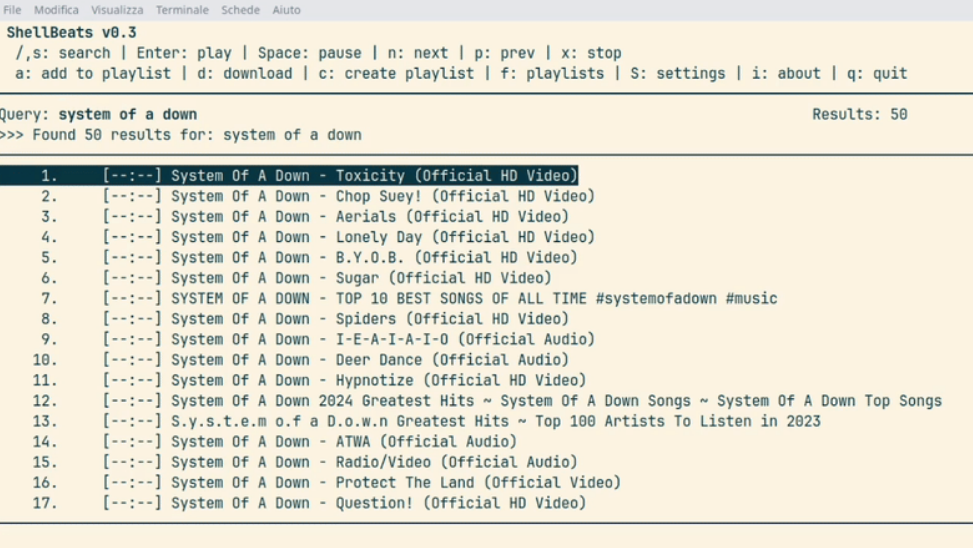
PORTLAND, Ore. — For builders who prefer a clean terminal over a busy browser, Shellbeats offers a focused way to listen to YouTube audio without the overhead of a GUI. Built by maker lalo-space, the tool keeps control on the keyboard and the workflow in the shell—ideal for lab benches, headless boxes, or anyone who values small, dependable tools.
What is Shellbeats?
Shellbeats is a command-line music player tailored for YouTube. It lets you search, stream, and organize tracks directly from the terminal, delivering the feel of a no-nonsense MP3 player with modern streaming convenience.
Key features
- Search YouTube from the terminal and play results immediately
- Stream individual tracks or full playlists without leaving the shell
- Create and edit playlists inside the tool
- Optional MP3 downloads for offline listening
- Fully keyboard-driven, lightweight, and distraction-free
Why it matters to makers
- Low overhead: keeps resources free for builds, compiles, and CAD
- Headless- and remote-friendly: perfect for shop PCs and dev servers
- Scriptable habits: fits neatly into terminal-first workflows
- Community-friendly: a small tool that invites tinkering and contribution
The Editor’s Take: Shellbeats is the kind of practical utility that sticks around—simple enough to trust on a dusty shop machine, flexible enough to fold into your dotfiles. For DIY audio projects, kiosk builds, or minimal media rigs, it’s a solid building block that reflects the best of the open, tool-making ethos.
Getting started
- Use it where you already work: your main dev terminal, tmux pane, or a lab PC
- Build focused playlists for testing speakers, amps, or shop sessions
- Download MP3s when you need offline reference tracks
Read the original report and project details via Hackaday: Playing YouTube From The Command Line. Credit: Shellbeats by lalo-space.
Shellbeats, command-line YouTube player, terminal music player, YouTube audio in terminal, playlist MP3 download, maker tools
Credit and Source: Hackaday